Computer Aided Design (CAD) has changed the way designers, engineers and architects work, making it possible to create precise, efficient and complex designs on screen. For beginners, and even for experienced users, the language of CAD can feel like a subject on its own.
Whether you are just starting or you want to refresh your knowledge, understanding common CAD terms is an important step toward using your software more confidently and working more productively.
This guide introduces key CAD terms, phrases and jargon, explains why they matter in day to day work, and shows how a tool like DraftSight fits into this picture.

Why CAD Terminology Matters
CAD is used across many industries, including:
Manufacturing
Construction
Product design
Architecture
Knowing the language of CAD is not only about pressing the right buttons. It helps you:
Communicate clearly with colleagues and project partners
Read and interpret drawings correctly
Understand what different tools and commands actually do
For new users, learning the vocabulary makes the first months with CAD less confusing. For experienced users, it makes it easier to adopt new features and technologies with confidence.
CAD Terms and Definitions Every Designer Should Know
The following list covers some of the most common CAD terms, grouped by category. These definitions are not software specific and apply across many CAD tools.
1. Basic CAD operations
These terms describe core elements and actions you will see in most CAD systems.
DWG (Drawing File): A native CAD file format used to store 2D and 3D design information.
Sketch: A basic drawing or outline created in CAD, often used as the starting point for a design.
Modeling tools: Commands that let you create, edit or shape objects in 2D or 3D.
2. CAD annotation terms
Annotations add information to a drawing so that other people can read and understand it correctly.
Dimensioning: Adding measurements to a drawing so that sizes, distances and tolerances are clear for manufacturing or assembly.
Hatching: Applying patterns or fills to show areas such as sections, materials or zones in a drawing.
Leader line: A line with an arrow that connects a note, symbol or dimension to a specific feature in the drawing.
3. Geometry related words
These terms relate to the shapes and edges that make up your design.
Polyline: A connected sequence of line or arc segments that behaves as a single object.
Extrude: A function that takes a 2D shape and extends it along a direction to form a 3D object.
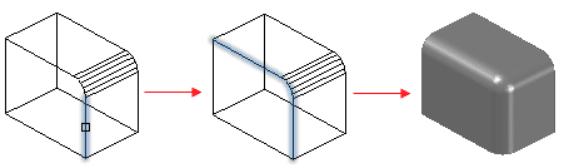
Fillet: A rounded transition between two edges or surfaces.
![]()
4. CAD editing jargon
These tools help you adjust and refine existing geometry and layouts.
Trim: Removes unwanted parts of lines or shapes where they intersect with other objects.
Offset: Creates a copy of an object at a specified distance, commonly used for parallel lines or concentric shapes.
Mirror: Produces a reflected copy of geometry across a chosen axis or line.
Realise the Value of CAD Knowledge
Learning CAD terms is not just an academic exercise. It is a foundation for:
Using your software more efficiently
Reducing misunderstandings in design and production
Making better decisions when choosing tools and workflows
Whether you are an engineering student, a practicing designer or a newcomer to CAD, taking the time to build your vocabulary will help you:
Work more confidently
Save time on daily tasks
Produce clearer, more accurate drawings
Use a mix of practice, learning resources and community support, combined with tools like DraftSight, to build a solid understanding of CAD language and get more value out of your design work.
Book a DraftSight Demo with CADVision Systems
Find out how DraftSight 2D CAD can replace your current software and speed up your drafting work. Our team will walk you through a live demo based on your own drawings. Contact us now.
Adapted from DraftSight Blog: “CAD Terms: Everything You Need to Know”.